A Personal Finance Manager: From Side Feature to Core Product
As groundwork to represent a full financial profile, the challenge was to design a account dashboard, which can be used by anyone, disregarding their financial situation.
Pigtie is a micro-investing app on a mission to help younger users (18–32) take meaningful steps toward long-term financial planning and self-directed wealth accumulation. The product started with a round-up service, by automatically routing small amounts from a connected checking account into a custodian account, as a low-friction entry point into private retirement provision.
But investing consistently is only one side of the equation. To genuinely support users in building financial confidence and making better decisions, the team recognized a need to expand well beyond saving. This project was born from that ambition: an exploratory, full-cycle UCD initiative to identify and build new features that would give users a richer, more actionable view of their finances, powered by the existing PSD2 interface.
There was no predetermined design direction beyond the mission statement, which made this one of the most open-ended projects I have worked on. It moved through exploratory research, iterative concept development, a closed beta, and a full release, and as of 2026, the resulting feature has become the core concept of the entire app.
Core technical and product constraints:
New features had to be self-contained and must not interfere with the round-up feature, which was already seeing heavy usage
Only data available through the PSD2 interface could be used automatically; anything beyond that would require manual user input
The feature was to be a premium feature - meaning a paywall had to be placed. The team decided to try and put it into one tab of the main navigation to make the premium wall placement easier and continue with the self-contained theme.
UX Approach
Phase 1: Exploratory Research
Given the open scope, the research phase was extensive and intentionally broad.
Competitive audit: A thorough review of the personal finance app landscape: finance managers, banking apps, financial literacy tools, trading platforms, and other PSD2-based products. This provided a map of existing approaches, common patterns, and gaps worth exploring.
Online questionnaire: An open-ended survey covering what users wished existed in apps aligned with Pigtie's mission, what problems they encountered with current tools, and what they felt was missing from the market entirely. Screen concepts were included at the end of the survey (not the beginning) to avoid priming bias, and were rated on a Likert scale.
Co-creation workshops: Ten full-day workshops, each with five participants, all facilitated by me. Each session followed a structured arc.
Examples of prompts and written down wishes/user stories
An open conversation about money: personal relationships with finances, frustrations, aspirations. I prepared 30+ prompt questions drawn from the audit to keep discussions moving across different financial domains, without leading participants toward any particular conclusion.
Participants wrote down any thought they found interesting or relevant on post-its throughout. These became invaluable for understanding implicit priorities and later for constructing user stories.
As sessions progressed, questions became more focused, slowly shifting toward feature ideas and concrete scenarios. This fed into a co-creation phase with pre-prepared mockups, where participants could sketch, annotate, and iterate freely. This broad to narrow qualitative principle always works great in getting results from workshops, but is especially important here given the open brief: closing in on specifics too early could have contrained design ideas of the participants.
For participants who needed more structure, predefined thematic areas (savings, transactions, budgeting, etc.) served as starting anchors.
Examples of created paper prototypes
Research outcomes:
A rich qualitative dataset of ideas, frustrations, and mental models around personal finance
A comprehensive set of user stories and scenarios, clustered into themes and organized into epics
Paper prototypes as starting points for feature and UI development
A clear design direction for the next phase: an individual, multi-banking financial hub, in other words a personal finance cockpit, that would:
Display financial data from the PSD2 interface in a clear and understandable way, giving users full visibility into their financial situation
Offer tools to support planning and execution: budgeting, goal setting, saving
Feel approachable, modern, and built for a younger audience
Lay the groundwork for a future guidance or coaching layer across a user's full financial profile
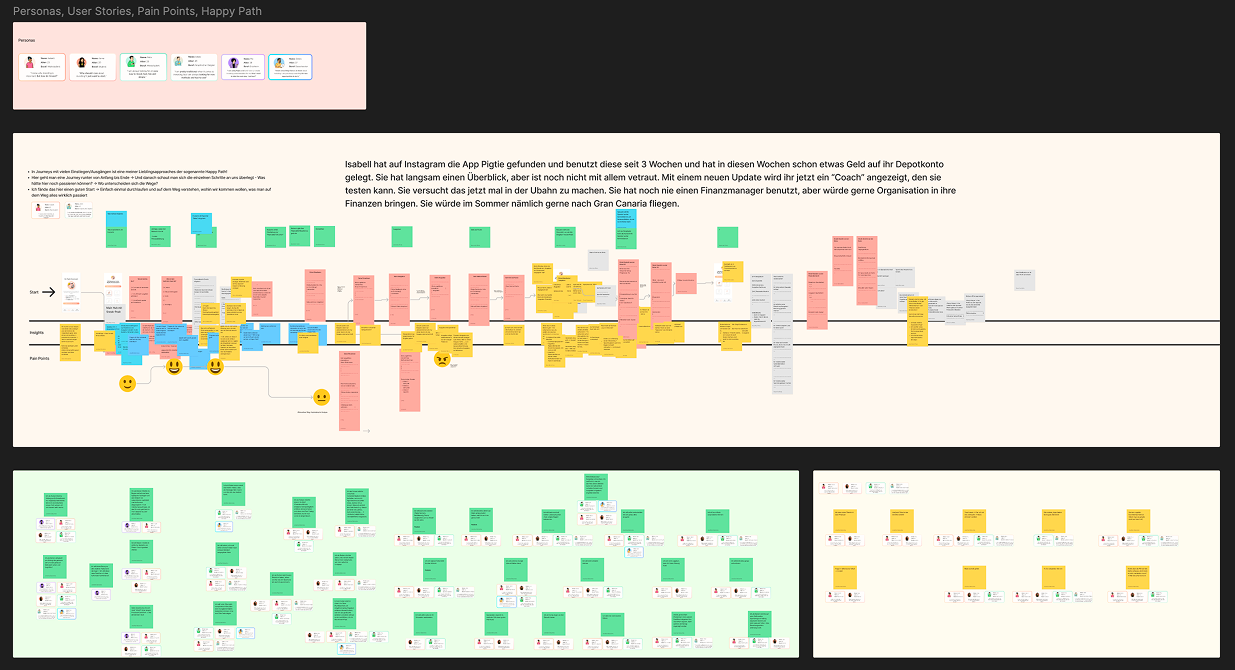
Personas, User Journey (Happy Path), User Stories, Pain Points
Phase 2: Concept & Design
With the research outputs and paper prototypes as a foundation, multiple design directions and concepts were developed and evaluated.
The central challenge was individualization. The research had made one thing very clear: financial profiles vary enormously between users. A one-size-fits-all dashboard would inevitably feel irrelevant to large parts of the user base. At the same time, the feature needed to remain self-contained within a single tab, and could not interfere with the round-up feature already in use.
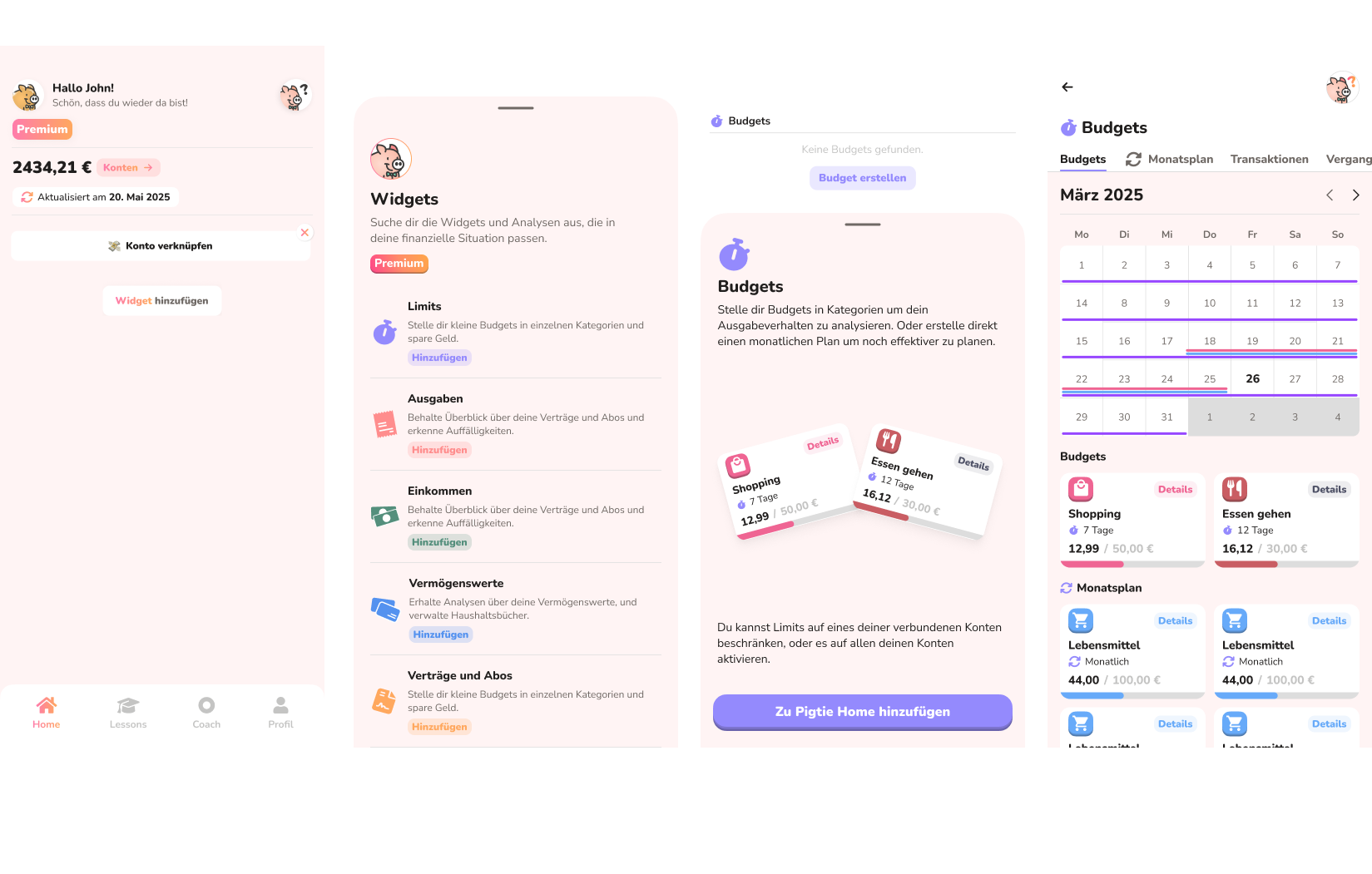
After exploring several approaches, a widget-based dashboard emerged as the most promising solution, which we explored as the concept by A/B testing. The core idea was an application of user-controlled personalization. Users should build their own view and decide themselves what is relevant to them, increasing both relevance and engagement. Its key advantages:
Users build their own view by selecting the widgets most relevant to their situation, making the experience inherently personal
Widgets serve as both data displays and entry points into functionality, giving users agency over the depth of their engagement
Financial circumstances change over time (a liabilities widget can be removed once a loan is paid off, for example) making the system naturally adaptive. This reflects a principle of designing for life change: rather than capturing a static snapshot of a user's situation, the system is built to evolve alongside it
From a development perspective, new features can be introduced as discrete widgets without disrupting the existing experience, enabling easier in-app testing and iteration
The dashboard fits neatly within a single tab and remains fully self-contained
The round-up feature can seamlessly be integrated as a widget at a later stage
Phase 3: Testing
The initial designs were tested through a combination of methods:
A/B testing: Conducted in controlled one-on-one interview sessions using a Wizard of Oz approach, with high-fidelity Figma click-prototypes. Tasks were assigned and experience quality was measured with the UEQ (User Experience Questionnaire).
Online questionnaire: Included screen versions of the concepts alongside qualitative questions about features and user preferences.
Following a clear decision on the overall UI direction, more focused usability testing addressed specific interaction patterns: adding and removing widgets, the UI of widget detail screens, and various data visualization approaches. The starting set of widgets for the initial launch was determined based on a combination of usability test findings and the earlier research data.
A closed beta was then planned and executed, using an MVP implementation of the final design. Feedback was collected across multiple channels, including dedicated WhatsApp groups.
Implementation & Results
Road to release:
A full design system and component library (sticker book) were created in Figma
A complete dev handoff was structured with clearly scoped project packages, tickets, and ongoing communication via GitHub and Linear
I contributed directly to development, coding frontend and UI in Flutter
The closed beta was supervised end-to-end, with in-app-event data analyzed in combination with qualitative user feedback
Post-release results:
The project was considered a success against its goals:
Users actively engaged with the new features, and first-week subscription targets were met
Existing user behavior around the round-up feature remained unchanged, the new feature had no negative impact on core product usage
UI reception was positive across questionnaire scores and follow-up usability testing
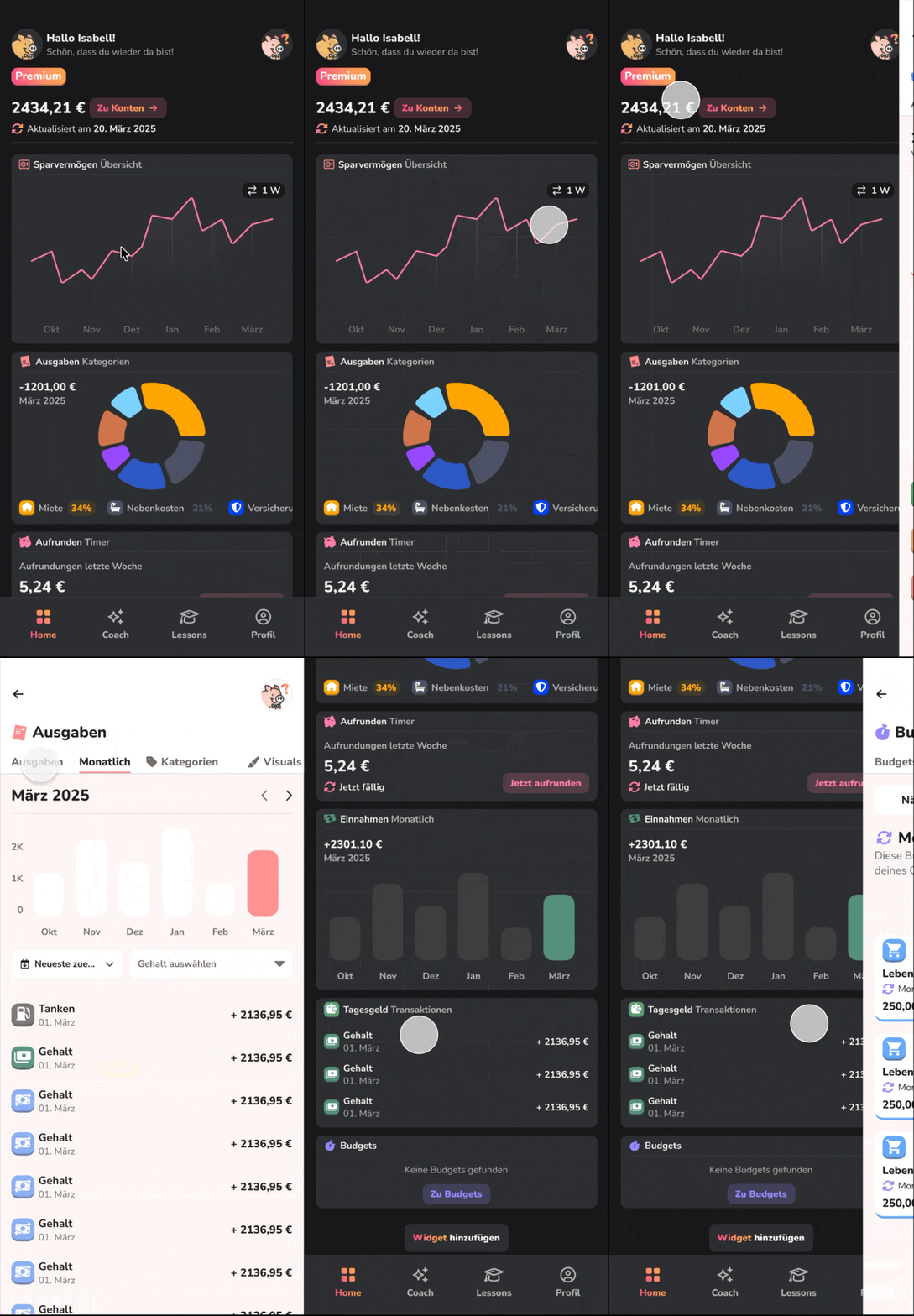
Final figma prototype showing light and dark design system
Reflection
This was one of the most ambitious projects I have worked on, building a complex, multi-feature system from scratch, navigating an open brief through research all the way to a live product. It taught me a great deal about designing and shipping large-scale feature systems.
What I would do differently:
Scope management: The project grew too large. In retrospect, launching with a fixed dashboard first and evolving it toward customization in a later iteration or offering the widget view as a separate step, would have been the more pragmatic path. Incremental delivery would have reduced risk and tightened feedback loops.
Parallelizing development earlier: Development took longer than expected, as the entire system needed to be built before anything could ship. Defining the components that were certain to exist regardless of testing outcomes earlier in the process would have allowed backend logic and frontend architecture decisions to proceed in parallel with UX iteration, rather than sequentially.
UI system planning: Working alone on a project of this scale exposed some gaps in my design systems thinking at the time. Assigning a distinct color to each widget, for example, created a constraint that had to be walked back later. Similarly, the approach to information density and layout took several iterations to get right. These were valuable lessons, but ones I would now address during the design system phase, before any prototype goes into testing.